Forge Bible Bot

Free for Windows and Mac.

Forge One

A free desktop app for Windows and Mac that works alongside Forge Bible Bot. It reaches the parts of your stream a cloud service never can: your streaming software, your sounds, your hotkeys and Stream Deck, with every chat in one window.

Free, like Forge Bible Bot. It always will be.

Twitch, Kick, Razo, YouTube, Rumble and TikTok in one list, a button that switches the scene and posts in chat, and the Actions behind it.
Say the passage as you teach, and it is on screen and in chat.

Forge Bible Bot runs in the cloud, so it keeps working when your computer is off. The trade is that it cannot reach your computer. It cannot switch an OBS scene, play a sound file off your drive, or answer a Stream Deck button.

Forge One is the other half. It runs on your PC, signs in with your Forge Bible Bot account, and does the local work that used to need a second or third program. Forge Bible Bot keeps doing everything it does today, whether Forge One is open or not.

It is free to download below, for Windows and Mac. Sign in with your Forge Bible Bot account to get it.

Get Forge One

Windows

Forge One 1.7.0 for Windows 10 and 11 (64-bit), about 126 MB. Once it is installed and paired, it updates on its own.

The installer is signed, so Windows names its publisher. Windows can still be careful with an app it has not seen often: if it says it protected your PC, choose More info, then Run anyway.

Mac

Forge One 1.4.1 for macOS 12 Monterey or newer, about 140 MB. Signed and checked by Apple, and it updates itself.

Not sure which? Open the Apple menu, then About This Mac. Chip says Apple M1 or later: Apple chip. Processor says Intel: Intel.

Open the downloaded file and drag Forge One into Applications, then open it.

Downloading asks you to sign in with your Forge Bible Bot account, with Twitch, Kick or Razo. New to Forge Bible Bot? Signing in sets it up, free, in about a minute.

What Forge One does

Chat

Every chat, one window

Twitch, Kick, Razo, YouTube, Rumble and TikTok in one list, in the app and in an OBS dock. Reply to a message on its own platform, or send to all of them at once.

  • Moderation from one place. Right-click a line to delete it, time someone out, ban, pin a message or open a viewer card.
  • Show a message on stream. Put any viewer's message on screen with one click.
  • The chat bridge. Share your Twitch, Kick and Razo chats with each other, and bring YouTube, Rumble and TikTok into Twitch and Kick, so one community talks in one room.
  • A chat overlay with skins. The combined chat on your stream, in a look you choose, running across the screen or down the side.
  • YouTube, Rumble and TikTok your way. YouTube chat reads with a free key of your own, Rumble with the link Rumble gives every creator, and TikTok is unofficial, so it stays off until you turn it on.
  • Razo through Forge Bible Bot. Your Razo chat, follows and live status come in through Forge Bible Bot. A line you send to Razo is posted by ForgeBibleBot, because Razo has no way for apps to post as you.

Actions

When this happens, do that

Chat commands, channel point rewards, follows, subs, raids, cheers, Kicks, Super Chats, hotkeys, Stream Deck keys, a wheel landing and even words you say out loud can start an action.
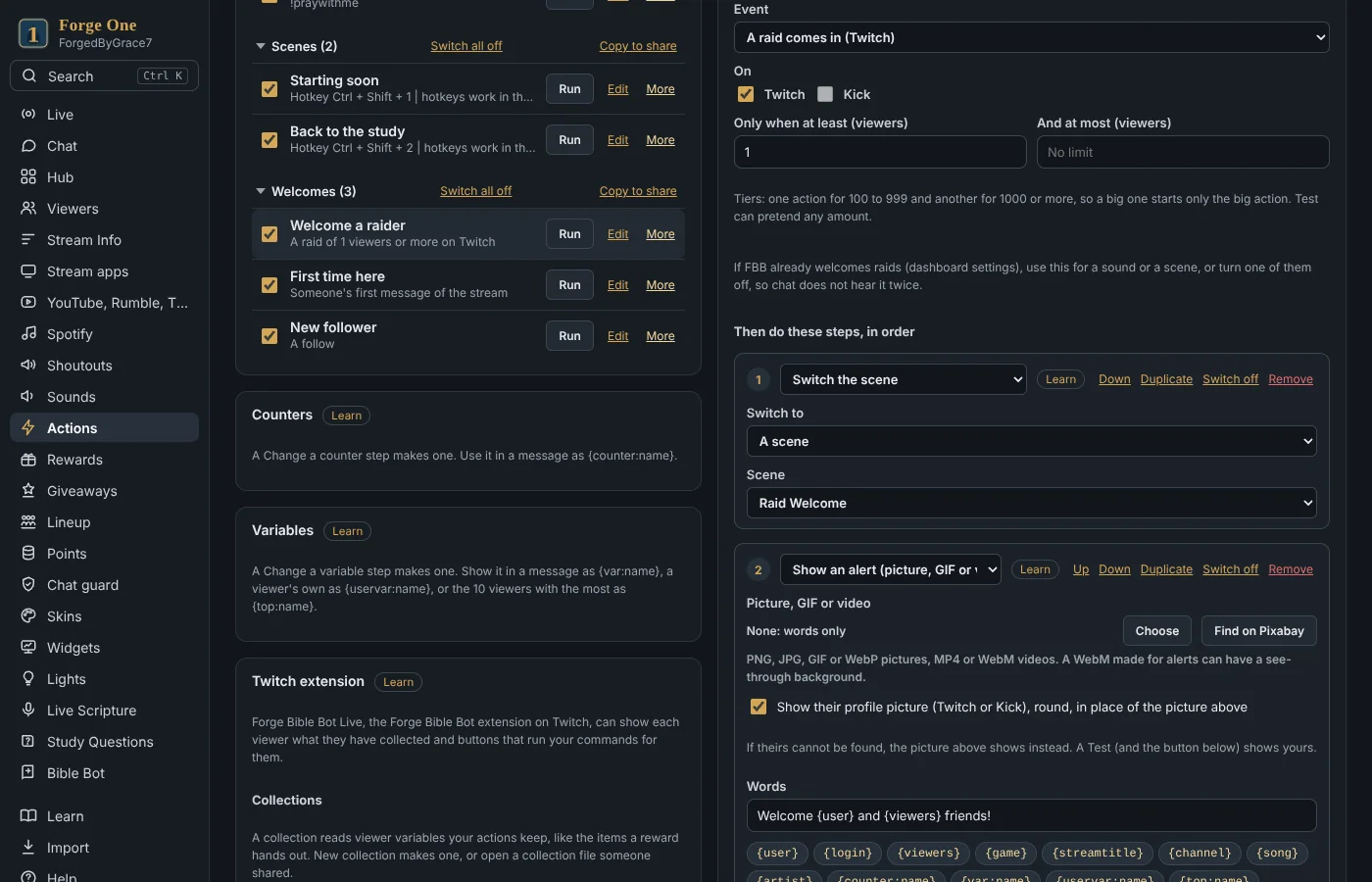
  • Steps for your stream. Switch scenes, sources and filters in OBS, Streamlabs Desktop or Meld Studio, play sounds, show alerts, read text aloud, post in chat and Discord, and change points.
  • Safe steps for what used to take code. Moderation (built so a command can never be turned on you or your moderators), clip shoutouts, key presses, VTube Studio, Lumia Stream, Voicemod and MIDI.
  • As simple or as deep as you like. If and otherwise, random choices, waits, variables for each viewer and web requests are there when you want them.
  • Bring what you already built. Import your setup from Streamer.bot, Firebot or Mix It Up.
  • Share setups. Share actions, wheels and study sets with a code, and find ones other streamers made in The Forge.
An action in Forge One: a raid switches the scene, shows an alert and the shoutout card, and welcomes them in chat

On stream

One overlay for everything

A single browser source in your streaming software carries your alerts, widgets and cards.

  • Alerts and sounds. Your own pictures, videos and sounds for follows, subs, raids and the rest.
  • Wheels and dice. Spin a wheel in one of ten looks, or roll 3D dice, from a command, a reward or a button.
  • Goals and timers. Goals counted from Twitch, Kick and YouTube, a Supportathon goal that counts every kind of support, and a subathon timer.
  • More widgets. An emote wall, credits, now playing and recent events.
  • Shoutout cards. Design your own card, and show it for the streamers on your list when they chat on Twitch or Kick, or on YouTube, Rumble and TikTok while Forge One reads those chats.
  • Your own HTML. Build any overlay you can imagine and fill it from chat.
Three of the ten wheel looks, and the 3D dice: a d20, a mixed set and three d6.

Scripture

Bible study, live

Tools made for streams that open the Word together.
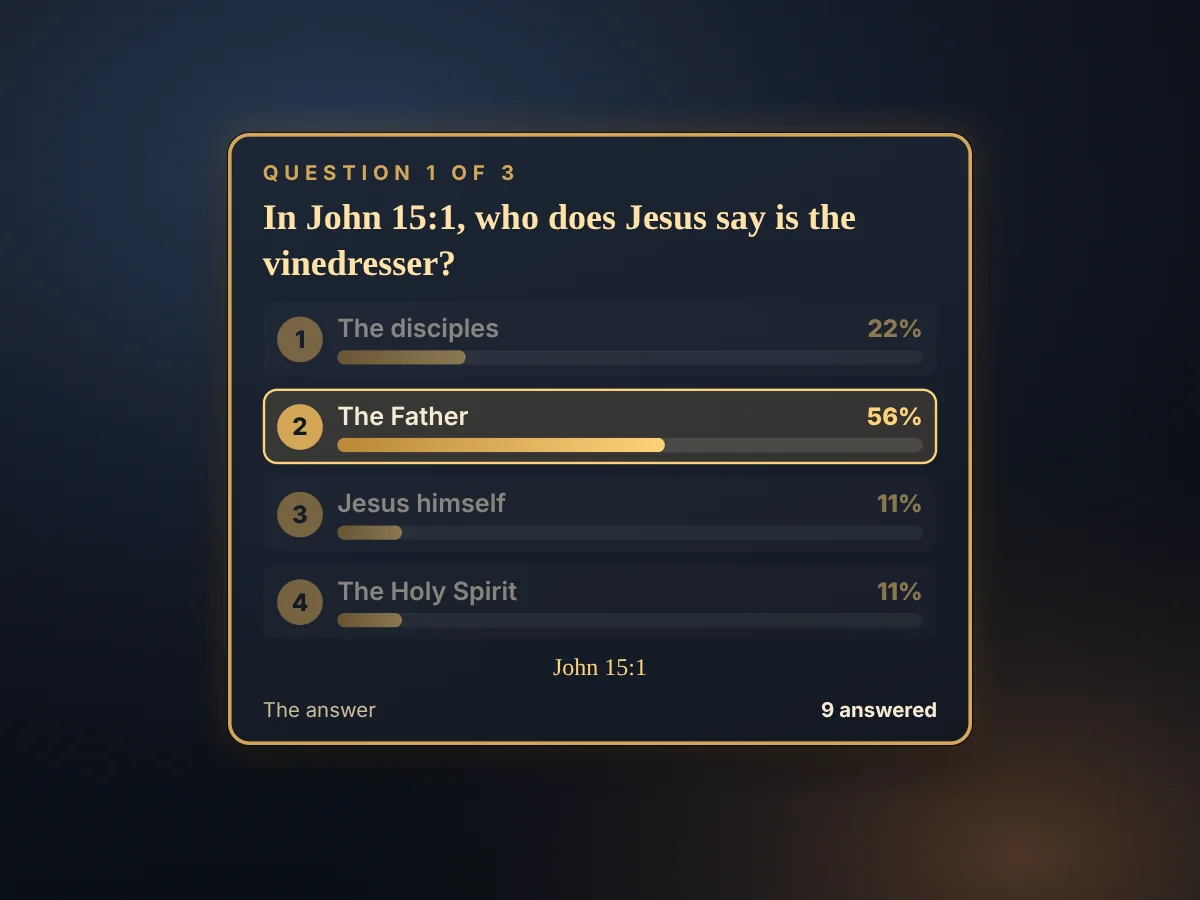
  • Study Questions. Write questions for your study, polls and questions to reflect on, and every chat answers at once. The results show on stream, and a recap with links into the video goes to your Discord.
  • Live Scripture. It listens while you teach. Say a reference and the passage can appear on screen, without stopping to type.
  • A run of show. Plan the passages and questions for a study night and step through them live.
  • Greek, Hebrew, weights and measures. The words behind the English and what a cubit or a talent was, on screen as you mention them.
A Study Questions card on stream: who is the vinedresser in John 15:1, with the answer and the results

Community

Give chat something to do together

Tools that reward the people who show up week after week, with nothing to gamble.

  • Points. Earned by watching, chatting, following, giving and taking part, and spent on what you choose. Name them whatever fits your stream.
  • Bible trivia duels. Two viewers, one question from Scripture. Won by knowing the Word, never by chance.
  • Giveaways and the lineup. Fair giveaways from every chat, drawn on a wheel if you like, and a line of viewers waiting their turn for game nights and call-ins.
  • The Twitch extension. In Forge Bible Bot Live, viewers see their own points and collections, give points, challenge each other to Bible trivia duels, and press buttons that run your commands for them.

Your stream

Run the show from one app

The everyday controls, together.

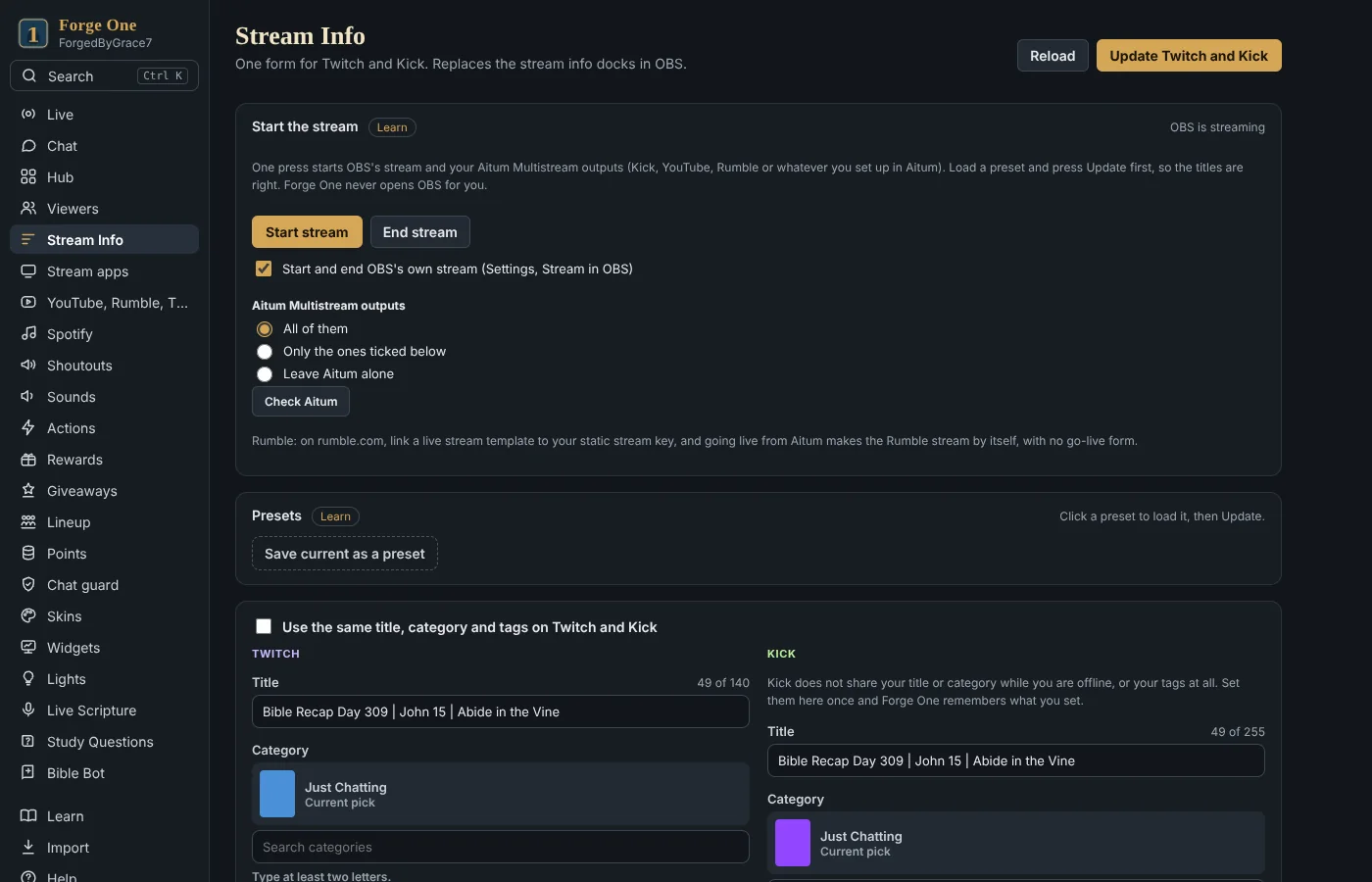
  • Stream info everywhere. Change your title and category on Twitch and Kick, and your YouTube live title, in one place, or load a preset.
  • Start your stream. One button starts streaming in OBS, with your Aitum Multistream outputs, and checks that each one went live.
  • Quick actions. Raids, shoutouts, ad breaks, polls, predictions, clips and stream markers.
  • Song requests and lights. Song requests through Spotify or Apple Music, and smart lights for common brands, scenes included.
  • Two PCs. A streaming PC and a second PC can work together, with one running the stream.
Forge One's Stream Info page: Start stream with the Aitum outputs, and the Twitch and Kick titles

Your team and your gear

Help from anywhere, keys at hand

The people who help you, and the buttons on your desk.
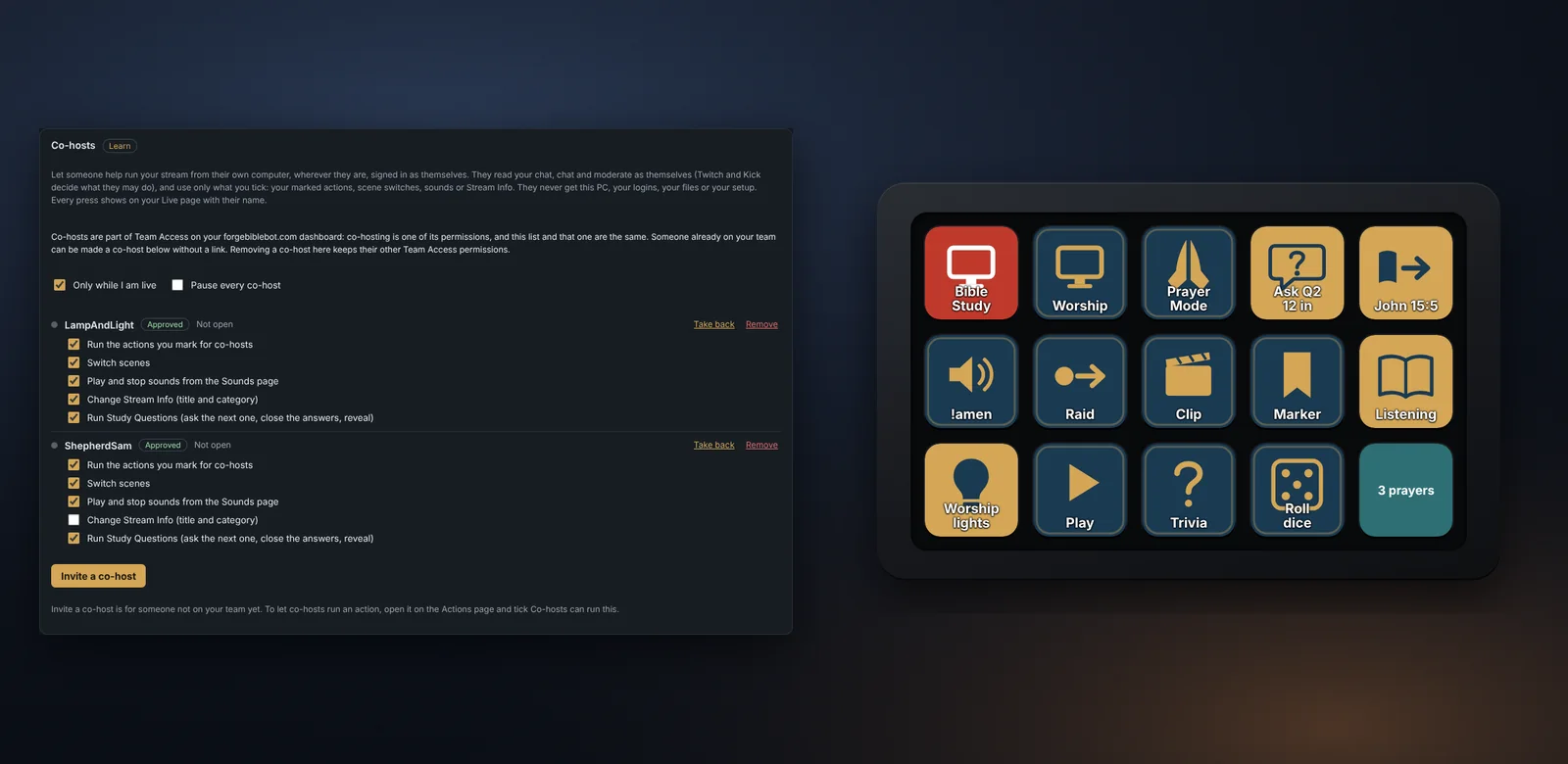
  • Co-hosts. Let someone help run your stream from their own computer, wherever they are, signed in as themselves. They use only what you tick, and never get your PC, your logins or your setup.
  • Stream Deck and Stream Dock. Keys and knobs for scenes, actions, sounds, the run of show, Study Questions, Spotify and more, on an Elgato Stream Deck or a MiraBox Stream Dock.
  • Part of Team Access. Co-hosts are the same list as Team Access on your Forge Bible Bot dashboard.
The Co-hosts card with what each co-host may do, beside Forge One's keys on a stream controller

Help built in

Never stuck for long

The answers live inside the app.

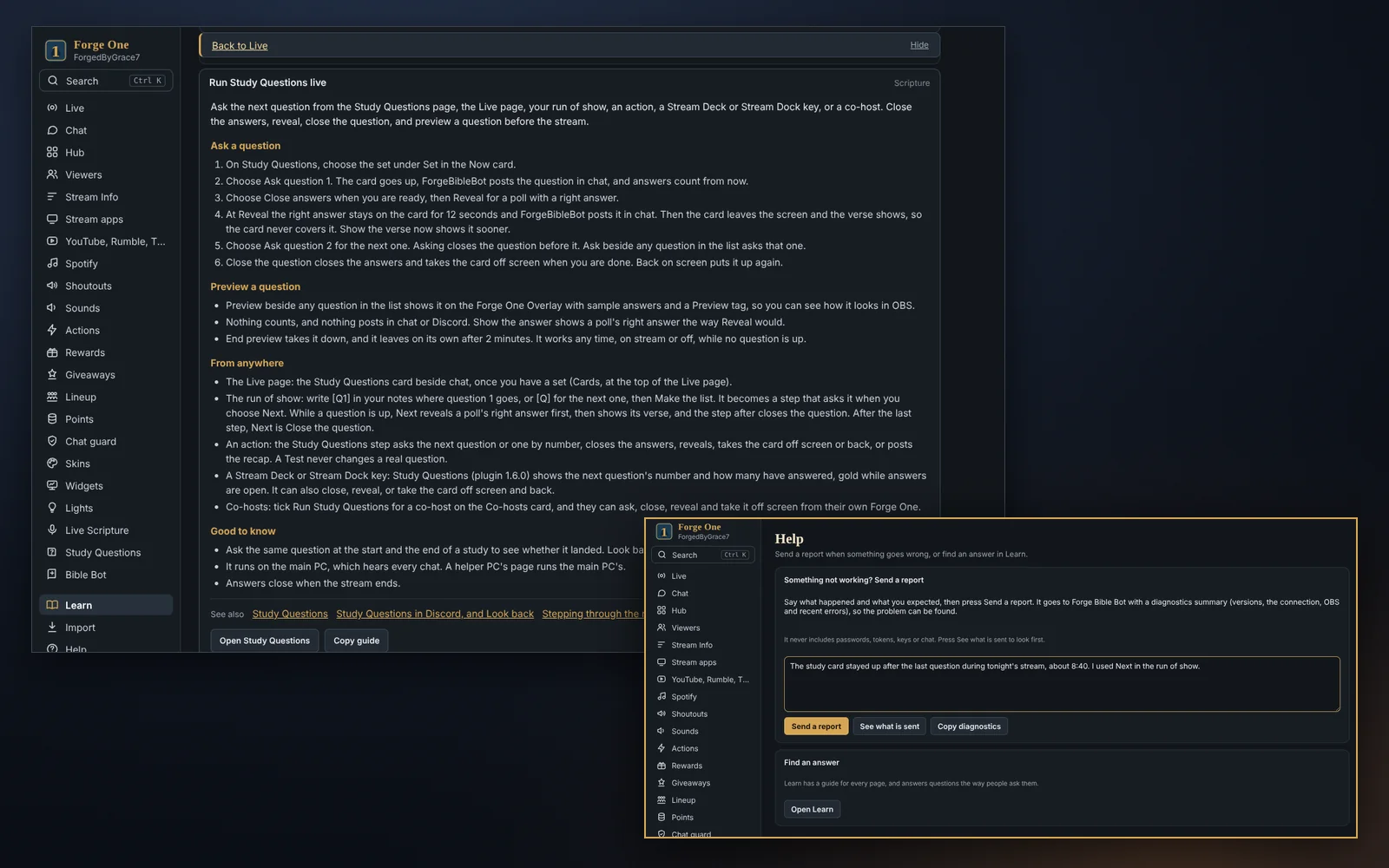
  • Learn. A step-by-step guide for every page, a Learn link on every card, and search that answers questions the way people ask them.
  • A setup guide. It opens once you pair and walks you through connecting your streaming software, the overlay and your first actions.
  • The Help page. Say what happened and send a report in one press. It never includes passwords, tokens, keys or chat.
  • It updates itself. On Windows and Mac, with what is new shown after each update.
Forge One's Learn page open at a guide, and the Help page with Send a report

How Forge One uses YouTube

Forge One can read your YouTube live chat, post in it, and change your live stream's title. Each part is optional.

The details, including what is stored and for how long, are in our Privacy Policy (section 5.9). Forge One uses YouTube API Services, and connecting means you agree to the YouTube Terms of Service.

Common questions

What does it cost?

Nothing. Forge One is free, like Forge Bible Bot, and it will stay that way. There is no paid tier.

Do I need Forge Bible Bot?

Yes. Forge One signs in with your Forge Bible Bot account, and the two work together. Forge Bible Bot is free too, and setup takes about a minute.

What does it run on?

Windows 10 and 11, and macOS 12 or newer on Apple chip and Intel Macs. It works with OBS Studio, Streamlabs Desktop and Meld Studio, and with Stream Deck and Stream Dock.

Can I bring my Streamer.bot, Firebot or Mix It Up setup?

Yes. Forge One reads your Streamer.bot, Firebot or Mix It Up backup and shows you what it found first: commands, timers, sounds, actions, shoutouts, counters and quotes. You choose what comes over, and anything that cannot come over yet is listed with the reason.

Is it hard to set up?

A setup guide walks you through it once you pair, and Learn has a guide for every page. If you can add a browser source in your streaming software, you can set it up.

What if something breaks?

Send a report from the Help page inside Forge One. It goes straight to ForgedByGrace7 with what is needed to find the problem, and never your passwords, tokens or chat.

Ready to try Forge One?

Free for Windows and Mac. Sign in with your Forge Bible Bot account, with Twitch, Kick or Razo connected, and it is ready.

Download for Windows Download for Mac (Apple chip)

On an Intel Mac? Download for Mac (Intel). New to Forge Bible Bot? Set it up first, it takes about a minute.